Work项目 Oct 20262026 年 10 月
PerchPerch
A menu bar and system tray app for people who use several Codex and Claude desktop accounts: see tasks and usage limits in one panel, and hand a task to another account through a Markdown document.在 macOS 菜单栏或 Windows 托盘里管理多个 Codex / Claude 桌面账号:在一个面板里看任务和额度,额度用完时用 Markdown 文档把任务交给另一个账号。
- Status状态
- Released · macOS 1.1.0, Windows 0.2.0 preview已发布 · macOS 1.1.0,Windows 0.2.0 预览版
- My work我的工作
- Product and interface design, AI-assisted development of the native macOS and Windows apps, and releases产品与界面设计,macOS、Windows 两端原生应用的 AI 辅助开发与发布
Why I built it
I work with several Codex and Claude accounts. Each desktop client shows one account at a time, so checking which tasks were still running, or how much of the five-hour and weekly limits remained, meant opening every client in turn. When a limit ran out in the middle of a task, moving the work to another account meant rebuilding the context by hand.
One of Perch’s starting points is agent-desk by shuqiang. Perch can import agent-desk’s account list and leaves agent-desk’s own data in place.
What it does
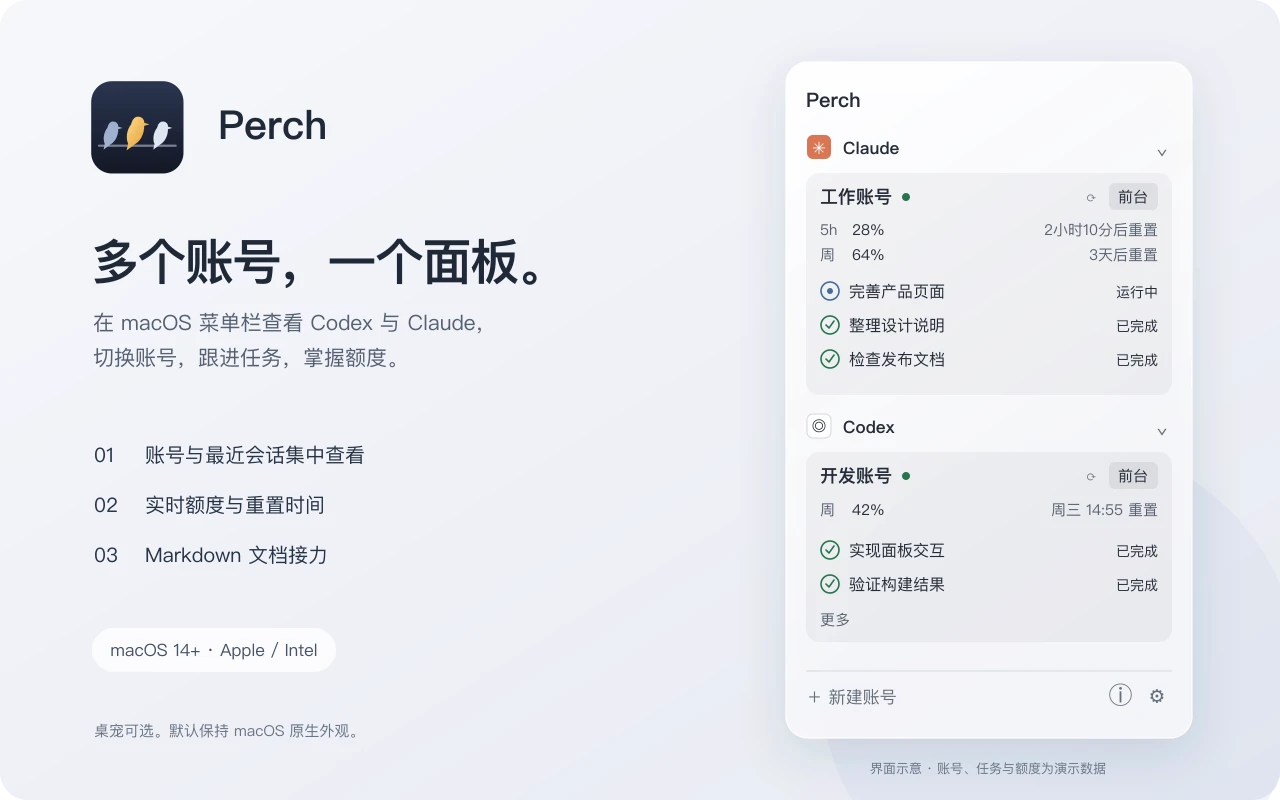
Accounts are grouped by Codex and Claude. Perch can start a separate client for each account, so logins and data stay apart, and it also finds clients that are already running. The panel lists running tasks and recent sessions, and shows the five-hour and weekly usage for each account together with the reset time. When a usage query fails, Perch keeps the last result and labels it with the time it was fetched.
Handing a task to another account

Right-click a stopped session and choose a target account. Perch copies a prompt and brings up the source client; the AI in the original conversation writes a handoff document to a given path. Back in Perch, “Continue handoff” copies the document and brings up the target client, where the person pastes it into a new conversation. Perch never sends a message by itself. Unfinished handoffs survive a restart, and recent handoffs stay in the panel.
Two native apps
The macOS app is built with SwiftPM, AppKit, and SwiftUI. The Windows app is built with .NET and WPF and does not need a separate .NET install. The two apps share brand assets, interface copy, test fixtures, and design notes, but neither depends on the other’s platform code.
Perch opens the clients’ session databases read-only and reads only titles, status, and working directories, not chat content. To query usage it reads the account’s local sign-in in memory and sends it only to the official service; nothing is written to files or logs, and nothing is uploaded.
Current status
macOS 1.1.0 and the Windows 0.2.0 preview are available on GitHub Releases. Neither build is signed yet, so the system asks for confirmation on first launch. Running two personal accounts at the same time and the full cross-account handoff are still being tested.
为什么做
我同时用几个 Codex 和 Claude 账号。每个桌面客户端一次只显示一个账号,想知道哪些任务还在跑、5 小时和每周额度还剩多少,就得把客户端挨个打开。任务做到一半额度用完,换账号继续时还要手动把上下文重新交代一遍。
Perch 的来源之一是 shuqiang 的 agent-desk。Perch 可以直接导入 agent-desk 的账号列表,导入时不会删除 agent-desk 的数据。
能做什么
账号按 Codex 和 Claude 分组。Perch 可以为每个账号启动独立的客户端,登录和数据互不影响,已经在运行的客户端也会被自动发现。面板里列出正在运行的任务和最近的会话,每个账号显示 5 小时和每周额度的已用比例和重置时间。额度查询失败时,显示上一次的数据并注明查询时间。
用文档把任务交给另一个账号
右键一个已停下的会话,选择目标账号。Perch 复制一段提示词并调出原来的客户端,原对话里的 AI 把交接文档写到指定路径。回到 Perch 点“继续接力”,Perch 复制文档内容并调出目标客户端,用户在新对话里粘贴发送。Perch 不会自动发送任何消息。未完成的接力在重启后还在,最近的接力记录保留在面板里。
两端分别原生实现
macOS 版用 SwiftPM、AppKit 和 SwiftUI,Windows 版用 .NET 和 WPF,不需要另装 .NET。两端共用品牌素材、界面文案、测试样本和设计约定,平台代码互不依赖。
Perch 以只读方式打开客户端的会话数据库,只读取标题、状态和工作目录,不读取聊天内容。查询额度时,在内存中读取账号的本地登录授权,只发给官方服务,不写入文件或日志,也不上传任何数据。
目前状态
macOS 1.1.0 和 Windows 0.2.0 预览版已经在 GitHub Releases 发布。两个安装包都还没有签名,第一次打开时系统会要求确认。同时登录两个个人账号、完整的跨账号接力等场景还在实测中。
Links链接