Work项目 Sep–Nov 20252025 年 9–11 月
DialogTreeDialogTree
A tree-shaped workspace for revisiting and organizing long-running LLM conversations; the interface became Branchat用于回溯与整理长程 LLM 对话的树状工作区;其界面发展为 CHI 2026 海报论文 Branchat。
- Status状态
- Closed-source collaborative product & research闭源合作产品与研究
- My work我的工作
- Co-creator · product direction共同创作者 · 产品方向、交互设计与全栈开发
Demo演示
See how it works.看看它是如何工作的。
The problem
An LLM conversation starts out feeling light: ask, answer, continue. But as a task develops, it becomes a long hallway. Alternatives disappear behind the newest message; returning to an earlier decision means scrolling, reconstructing context, and hoping the right thread is still there.
Design approach
Li Ran and I asked a simple question: what if a conversation behaved less like a transcript and more like a workspace? We treated revisitation as a first-class interaction—something people should be able to see, navigate, compare, and branch from without first rebuilding the past in their heads.
DialogTree
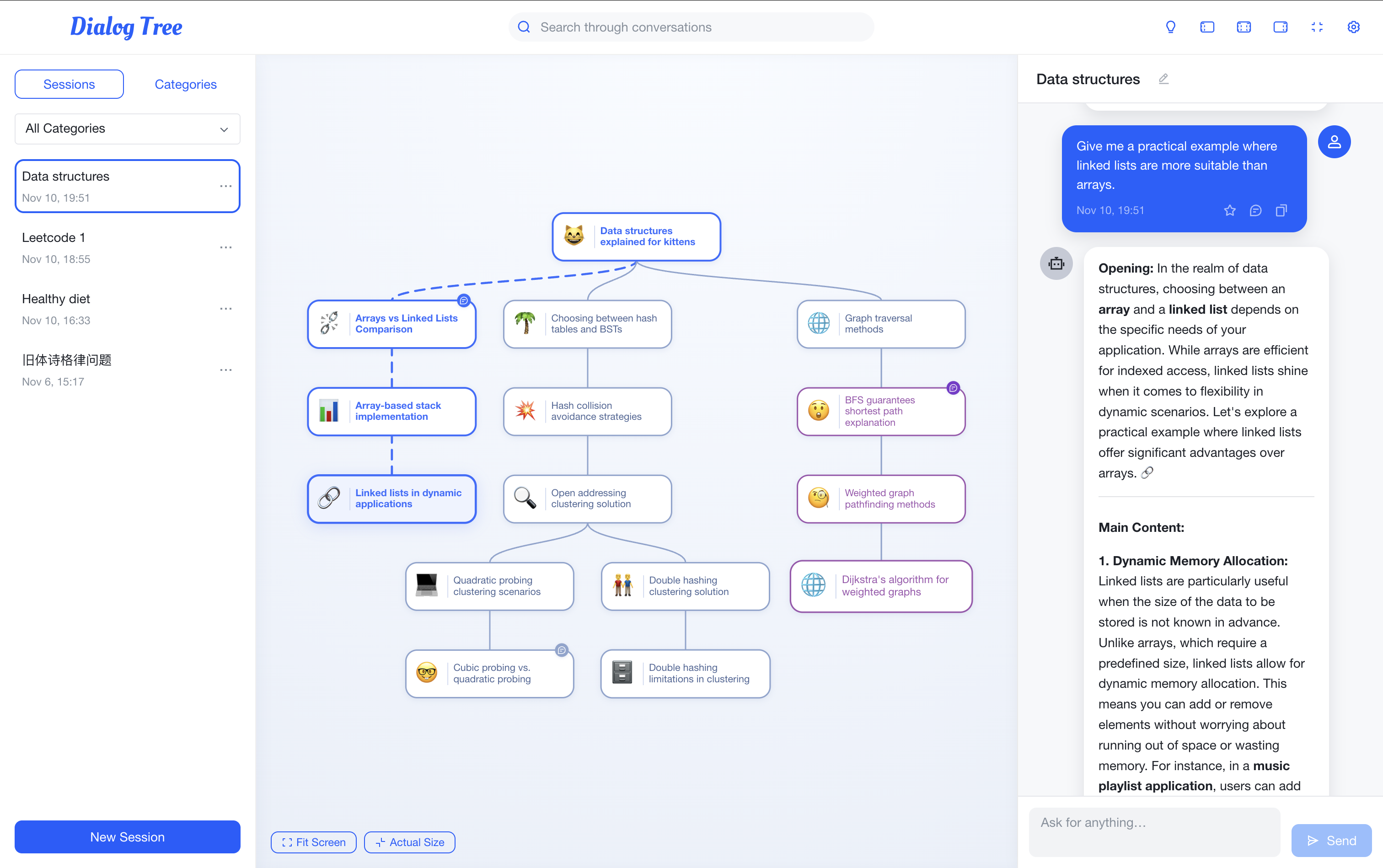
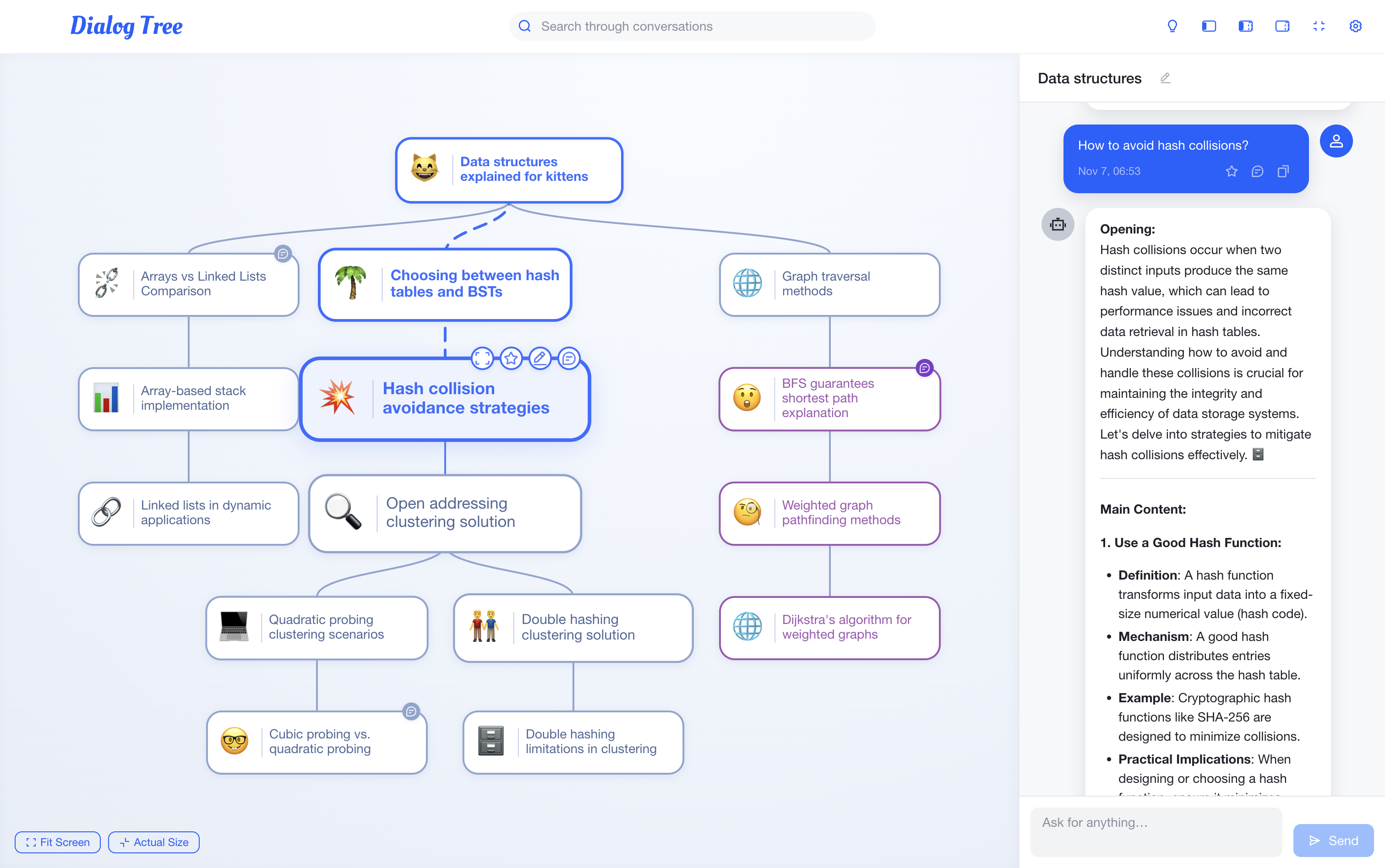
DialogTree is the product expression of that idea. It turns a conversation into an interactive tree: follow a path, fork from any node, mark what matters, and retrieve earlier material through text or semantic search. Underneath are a D3-based workspace, streaming chat, persistent history, and retrieval-aware search; on the surface, the goal is simply to make a long conversation feel inhabitable again.
Interaction
1. Start a new root conversation—or select an existing node. Selecting a node makes it the active point of departure; a new message there becomes a child conversation. Earlier work remains intact, so an alternative can grow without overwriting the original path.
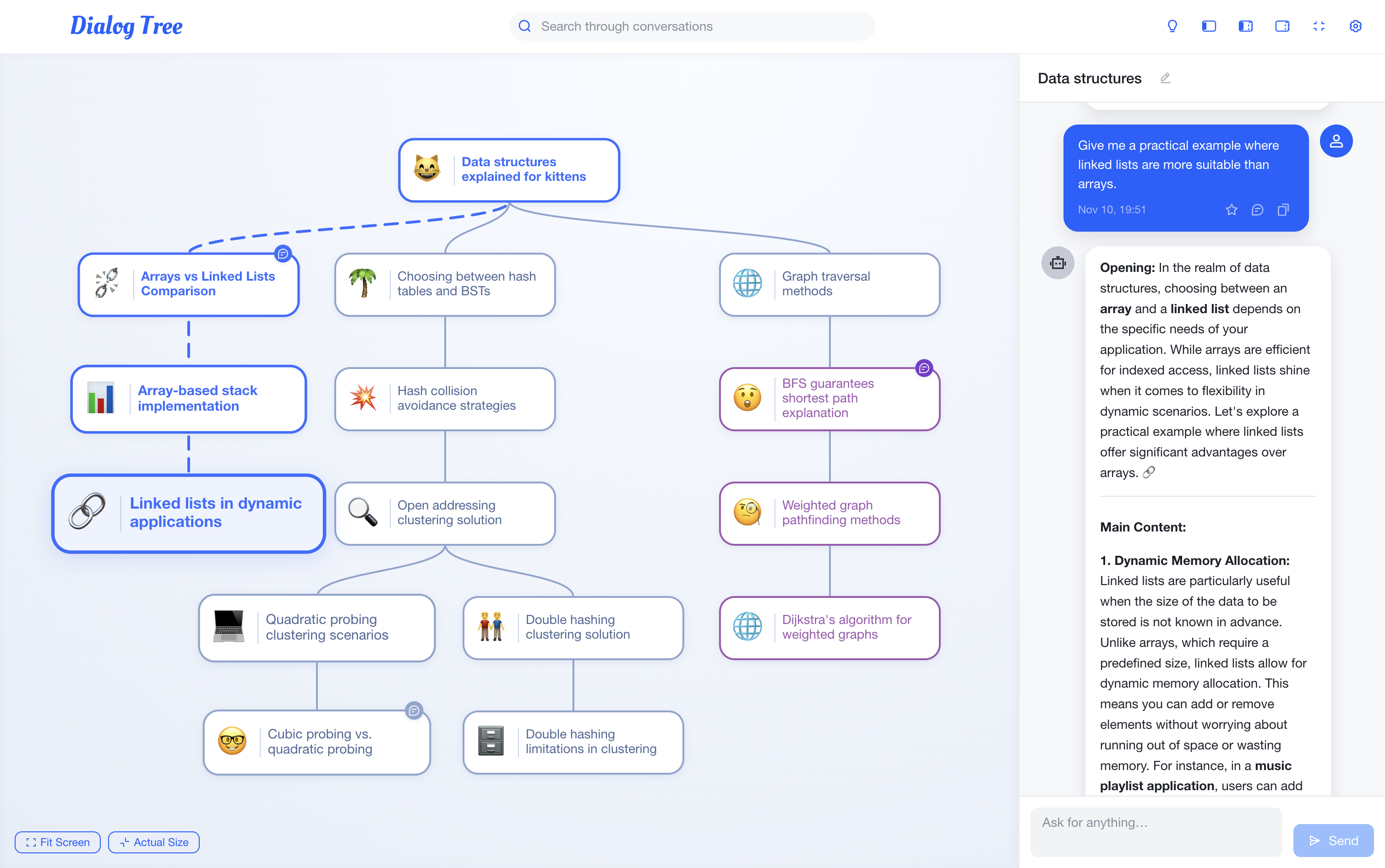
2. Change the node, change the context. The right-hand chat is deliberately narrow: it shows the selected node and its ancestor chain, not every sibling branch. This gives each continuation the context that led to it, while keeping competing directions available in the tree.
From prototype to Branchat
The product also became the research prototype for Branchat: A Tree-Structured Interface for Efficient Revisitation in Long-Horizon LLM Conversations, an ACM CHI 2026 Poster co-authored by Jiaming Li, Peinuan Qin, and Yi-Chieh Lee. We designed information-revisitation tasks, instrumented the prototype, and ran a 12-participant within-subject study with a Latin-square A/B design. Across complex retrieval tasks, the tree interface supported faster completion and a lower reported cognitive burden—evidence that interface structure can change how people keep hold of context while working with an LLM.
问题
随着 LLM 对话延长,线性聊天界面会把早期讨论越推越远。用户若要回看某个决策、比较不同思路或复用既有上下文,往往只能反复滚动并手动重建对话脉络。
设计思路
我和李然想把对话从线性记录变成可导航的知识结构。重点不只是展示更多消息,而是让用户能够定位上下文、比较分支,并从任意节点继续展开新的探索。
DialogTree
DialogTree 将对话组织为可交互的树状结构。用户可以沿路径浏览、从任意节点创建分支、标注关键节点,并通过文本或语义检索找回历史内容。产品结合 D3 树状工作区、流式聊天、持久化对话记录和检索感知搜索,用于支持长对话中的回溯与管理。
交互方式
1. 创建一个新的根对话,或选择已有节点继续。 选中节点后,它就是当前的出发点;新的输入会生成它的子对话。原有路径不会被改写,因此不同思路可以同时保留、继续生长。
2. 切换节点,也切换上下文。 右侧不会展示整棵树的全部消息,而只显示当前节点及其直系祖先形成的路径。这样,每次继续对话都带着它自己的来路,同时其他方向仍留在树上可随时回访。
从原型到 Branchat
2026 年,DialogTree 的核心交互发展为研究原型 Branchat: A Tree-Structured Interface for Efficient Revisitation in Long-Horizon LLM Conversations。该工作由 Jiaming Li、Peinuan Qin 和 Yi-Chieh Lee 共同完成,并以 ACM CHI 2026 海报论文形式发表。我们围绕信息回溯设计实验任务,在原型中记录交互行为,并以拉丁方 A/B 设计完成 12 人组内实验。结果显示,在需要反复检索和整合信息的复杂任务中,树状界面能够提升完成效率,并降低参与者报告的认知负担。
Links链接